Universal Tv Remote-Cast to TV
- 4.3
- Rating
- 50.00M
- Installs
- Free
- Price
 Analysis by App-foxy
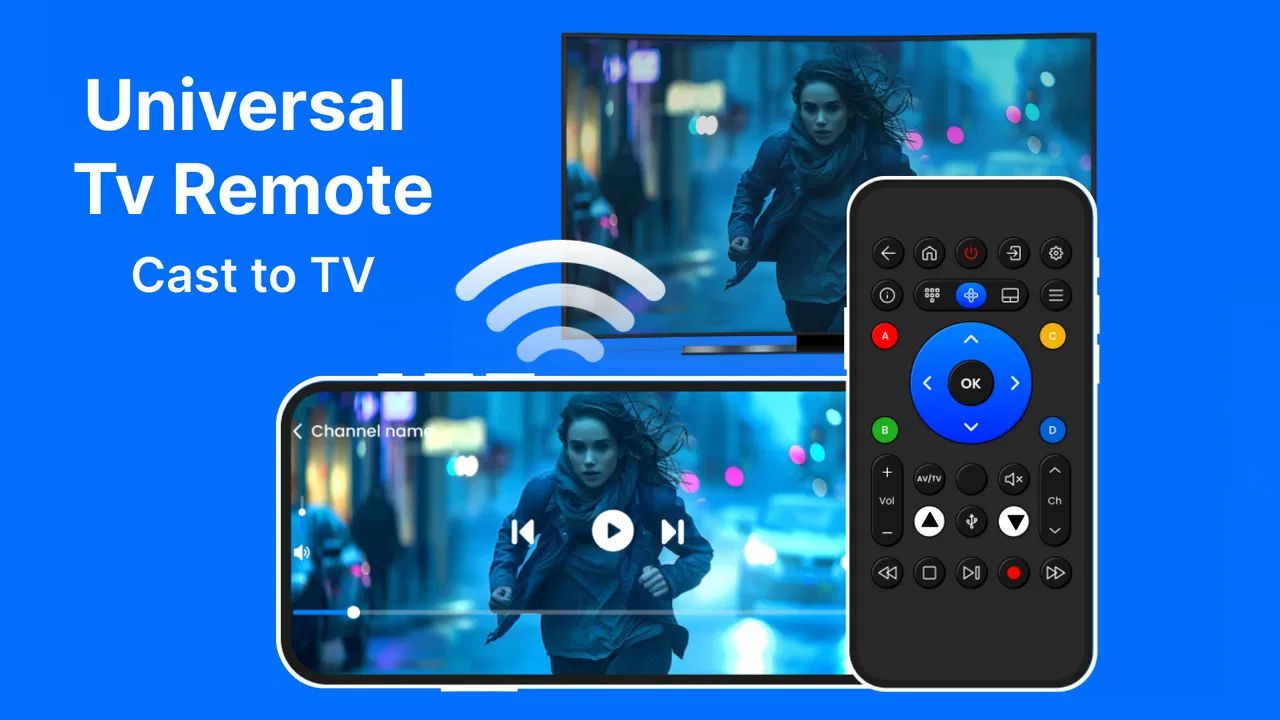
I found Universal Tv Remote-Cast to TV most useful when I treated it as a practical backup for everyday television control rather than as a guaranteed replacement for every physical remote. It is a free House & Home app from One Music Player, designed to control compatible televisions and support casting to Chromecast and other TVs. The idea is simple: put essential controls on a phone that is usually nearby, then use the same device when the original remote has disappeared between sofa cushions.
That simplicity matters for accessibility. A phone can be easier to find, hold, enlarge, and position than a small remote, especially for someone who struggles with tiny buttons or low-contrast labels. At the same time, moving television control onto a touchscreen introduces its own obstacles. The experience depends heavily on whether the TV and phone connect properly, how comfortably the user can operate the screen, and whether touch controls are preferable to physical buttons.
How the interface feels to read and navigate
On first use, I approached the app as I would any universal remote: look for the basic controls, connect the television, and test a few commands before relying on it. That workflow is more important than the promotional promise of controlling “all” TVs. In real homes, compatibility and setup determine whether the app becomes a dependable tool or merely an emergency option.
You May Also Like

 AccuWeather: Weather Radar
AccuWeather Review: A Quick, Clear Forecast for Everyday Decisions
For everyday plans, the best forecast is the one you can understand quickly. AccuWeather makes rain timing, radar, and local conditions easy to act on, with a few trade-offs.

 Hill Climb Racing
Why Hill Climb Racing Still Turns Crashes Into One More Run
A tiny car, a bumpy hill and one more upgrade: Hill Climb Racing keeps resurfacing because its simple chaos makes every near-miss feel personal.

 AliExpress - Shopping App
AliExpress Makes Global Shopping Feel Personal, but Shoppers Bear the Risk
AliExpress turns a global marketplace into a pocket-sized discovery engine. Its reach is useful, its shopping loop compelling, and its trade-offs easy to miss.

 Lords Mobile: Kingdom Wars
Lords Mobile Is a Kingdom-Building Routine, Not a Quick Match
A case-by-case verdict on the building, battles, device demands, and social commitments that make Lords Mobile rewarding for some players and exhausting for others.

 PDF Scanner app - TapScanner
TapScanner Makes Paperwork Easier to Capture, Check, and Share
TapScanner makes scanning with a phone feel less like a rescue operation and more like a dependable step in getting work done. Its capture tools are useful, though not flawless.

 Block Blast!
Block Blast! Shows How Much a Puzzle Game Can Leave Out
A quiet grid game shows why puzzle players increasingly value instant clarity, repeatable skill and low-pressure play—and where the genre still needs to catch up.
More From Our News Desk
View All News


The biggest readability advantage comes from using a modern phone display instead of a compact remote. I can hold the screen closer, adjust the phone’s system text size where supported, and change the viewing angle without searching for a small printed label. For people with reduced vision, that flexibility may be more useful than the app’s basic feature list suggests. It also helps when the physical remote has worn markings or buttons that are difficult to distinguish.
There is a trade-off, though. A touchscreen does not provide the same physical separation between controls as a traditional remote. I cannot identify a button by touch alone in the same confident way, and accidental taps are possible when I am moving quickly. Someone who depends on tactile landmarks may find a familiar physical remote easier, even if its labels are smaller.
I recommend spending a few minutes arranging a consistent routine before handing the phone to another household member. Keep the device in the same place, open the remote screen before the television is needed, and test power, volume, navigation, and input controls. That small habit reduces the mental load of remembering where everything is and makes the app more approachable for a person who is less comfortable with changing interfaces.
The app’s public reception suggests that many people find the concept useful: it holds an average rating of 4.1 from around 98 thousand ratings, with nearly 1,000 written reviews. I would not treat those figures as a promise that every television will work identically, but they do show that the basic remote-control idea has reached a substantial audience.
Navigation that works best with a calm setup
For a user who gets overwhelmed by unfamiliar screens, the best approach is to avoid experimenting during a time-sensitive moment. Set it up earlier, confirm that the television responds, and leave the phone on a stable surface. This is especially helpful for older users or anyone who finds repeated connection attempts tiring.
I also prefer testing one function at a time. First I check whether the TV responds to power, then volume, then channel or directional controls, and finally casting. If one part fails, this method makes it easier to identify whether the problem is the connection, the TV, or the particular control being used. It is more reliable than assuming that a successful pairing means every function will behave perfectly.
Because the app is free to install, it is easy to try without committing money at the outset. It does include optional in-app purchases ranging from $0.99 to $99.99 per item, so I would pay attention to any purchase screen and avoid assuming that every function has the same cost structure. For a family choosing an accessibility aid, that distinction matters: try the basic workflow first and decide whether it genuinely improves control before spending anything.
Touch, movement, hearing, and vision in everyday use
Universal Tv Remote-Cast to TV can suit people who have difficulty pressing small physical buttons, provided they can operate a phone touchscreen comfortably. A larger screen may offer more room for deliberate taps, and the phone’s familiar gestures can be less intimidating than an unfamiliar television remote. This is a meaningful advantage for someone who already uses a smartphone confidently.
However, the app should not be described as universally accessible. Touchscreens require a certain level of precision, and the user must be able to hold or position the phone. Tremors, limited reach, fatigue, or difficulty maintaining a steady touch can make a virtual remote frustrating. A physical remote with raised buttons, a voice-controlled system, or a dedicated adaptive controller may be better for those situations.
I would also consider the difference between visual and tactile feedback. A physical button confirms its location through touch, while a phone generally confirms interaction through the display and the television’s response. If a user has low vision, the ability to bring the screen closer can help. If a user has difficulty seeing changing screen elements or needs strong tactile guidance, the phone may not offer enough certainty.
Hearing-related needs create a different question. The app’s main value is sending control commands and supporting casting, so a person who cannot easily hear the television may still appreciate having a convenient way to adjust volume or change content. But the app itself does not remove the need to understand what is happening on the TV. Captions, visual indicators, and the television’s own accessibility settings remain important, and those depend on the TV and the content being watched.
For users with cognitive or memory-related challenges, the app can reduce one common problem: losing the physical remote. A phone is often kept nearby and can be easier to locate. The opposite can also happen, because a phone contains many distractions and changing notifications. I would use a dedicated home-screen shortcut or keep the app in a clearly named folder if the user is comfortable with that arrangement.
A realistic living-room example
Imagine someone settling down to watch television while another family member has taken the original remote to a different room. With the app already connected, the phone can provide a quick way to adjust volume or navigate without requiring anyone to search. That is where I see the strongest everyday value: not replacing every control system, but making a missing or inconvenient remote less disruptive.
For a person with limited hand strength, placing the phone on a table may be easier than gripping a narrow remote. They can tap from a supported position instead of reaching toward the television. The benefit disappears if the phone must be repeatedly picked up, unlocked, reconnected, or aimed in a particular way, so I would test the complete sequence rather than judging accessibility from the screen alone.
Casting creates another useful context. If someone prefers selecting content on a phone instead of navigating menus from across the room, sending it to a compatible television or Chromecast may reduce the need for repeated directional-button presses. That can be more comfortable for users who find long TV menus tiring. It is not automatically better for everyone, though; casting introduces another step and may be confusing when the phone, TV, and content source are not behaving as expected.
When the phone is more accessible than the remote
The phone has several practical strengths that a standard remote rarely combines in one place. Its screen can be viewed close up, it is usually familiar, and it can be held in a position that suits the user. A person who struggles to read tiny labels may benefit more from that flexibility than from a remote with many dedicated buttons.
The app may also help households where different people need different control styles. One person can use the phone while another uses the original remote. That shared arrangement is less disruptive than replacing the television’s entire setup. I like this as an inclusive approach because it does not force every user to adopt the same method.
Still, the app is not automatically superior to the television manufacturer’s own remote app or a voice assistant. A manufacturer-specific option may offer deeper integration with one TV model, while voice control may be preferable for someone who cannot use a touchscreen reliably. A physical remote remains the simplest choice when tactile feedback, instant response, and independence from a phone are the priorities.
Connection friction and the barriers that remain
The main barrier is not reading the controls; it is getting all the relevant devices to communicate. A universal remote app can only be useful when the phone and television are compatible and connected in the expected way. If the setup fails, the user may be left navigating technical menus without a physical fallback. That is particularly difficult for someone who relies on another person for device configuration.
I would therefore set up the app with assistance if the user has limited technical confidence. Do not wait until the television is needed. Confirm that the phone can control the TV from the usual seating position, then keep the original remote somewhere known. A backup is not a sign that the app failed; it is sensible planning for any wireless control method.
Network-dependent functions can also create uncertainty. Casting is convenient when it works, but it involves more than simply pressing volume or power. The phone, television, and casting target need to be recognized correctly, and the user may have to understand which device is currently selected. For someone with cognitive or visual challenges, a short written routine beside the TV can make this less demanding.
Another limitation is the risk of relying on a phone that is unavailable. If its battery is low, it is being used for a call, or it has been misplaced, the virtual remote disappears with it. A household should not remove its physical remote until everyone has confirmed that the app fits their needs. This is especially important for users who need independent access to television controls.
There is also an economic consideration. The app itself is free, but optional purchases are listed per item, with amounts from $0.99 up to $99.99. I would not recommend buying anything simply because a connection problem occurs. First check the TV selection, the phone’s connection, and the basic control workflow. Accessibility improvements should be judged by actual ease of use, not by the assumption that a paid option will solve every barrier.
The current version is 7.0.1, and it requires Android 6.0 or later. That makes the app relevant to many Android phones, but the age of the phone still matters in practice. A user with an older device may experience a less comfortable screen, slower interaction, or a battery that does not last through regular use. The app’s age rating is Everyone, which makes it suitable in broad household terms, but that label does not tell me whether the interface will suit a particular person’s motor or sensory needs.
Who should choose another solution
I would skip this app as a primary controller if the user needs guaranteed tactile buttons, cannot reliably operate a touchscreen, or cannot manage phone-based setup. In those cases, a large-button remote, an adaptive switch system, or a television’s built-in accessibility controls may be a better investment. The right choice depends on the person, not on whether a phone app sounds more modern.
I would also choose a different option for a household that wants deep control over one specific television model and already has a reliable official companion app. A universal tool is attractive when devices vary or the original remote is missing, but a manufacturer’s solution may behave more predictably with its own hardware. Similarly, a voice assistant can be a better fit when hands-free operation is the central need.
For casting, I would be cautious with users who become distressed by ambiguous device names or changing connection states. The feature can simplify content selection for some people and complicate it for others. A short, repeatable sequence—open the app, select the intended TV, start the content, and return to the remote controls—can help, but only after the household has tested it successfully.
My inclusive verdict after using it as a household remote
The strongest reason to try Universal Tv Remote-Cast to TV is flexibility, not the promise of replacing every remote. A phone can be larger, easier to locate, and more familiar than a small controller. For users with visual difficulties who can still operate touch controls, that may be a real improvement. For families, it also works well as a shared backup that makes television control less dependent on one physical object.
My recommendation is conditional. I would install it for someone who is comfortable with Android, can tap a touchscreen accurately, and wants a convenient way to control a compatible TV or cast content. I would set it up during a quiet moment, test the core commands, and leave a physical remote available until the new routine proves dependable.
One Music Player has made an app with a clear household purpose, and its reach—over 10 million installs—shows that the use case is easy for many people to understand. Yet popularity does not remove the practical questions around compatibility, connection steps, tactile feedback, and phone availability. Those questions are especially important when the app is being considered for an older adult or someone with a disability.
In my view, this is a worthwhile free trial rather than an automatic accessibility solution. It can make control more readable and convenient in the right hands, particularly when the original remote is hard to find or difficult to see. It is less suitable when independence depends on physical buttons, voice input, or a highly predictable device-specific interface. If you approach it as one tool in an inclusive living-room setup, rather than the only option, it has a useful place.
FAQs for Universal Tv Remote-Cast to TV
01How does Universal TV Remote-Cast to TV work?
Universal TV Remote-Cast to TV connects your smartphone to your TV via Wi-Fi, allowing you to control your TV with your phone. It mimics the functions of a physical remote control, enabling you to change channels, adjust volume, and access various menu options. Make sure both devices are on the same network for optimal performance.
02Is Universal TV Remote-Cast to TV compatible with all TV brands?
The app is designed to be compatible with a wide range of TV brands including Samsung, LG, Sony, and more. However, compatibility may vary depending on the model and year of your TV. It's recommended to check the app's compatibility list or test it with your specific TV model before relying on it fully.
03What features are included in Universal TV Remote-Cast to TV?
The app offers features such as channel navigation, volume control, power on/off, input switching, and access to smart features like streaming apps. Some versions may also include a keyboard for easier text input or voice command functionality, enhancing your TV viewing experience.
04Are there any in-app purchases or ads in Universal TV Remote-Cast to TV?
Yes, the app may include in-app purchases to unlock premium features or remove ads. While the basic version is free, upgrading may provide a more seamless experience with additional functionalities. It's advisable to review the app's payment options before purchasing to ensure it meets your needs.
05What should I do if Universal TV Remote-Cast to TV is not working?
If the app isn't working, ensure both your smartphone and TV are connected to the same Wi-Fi network. Restart both devices and try again. If issues persist, check for app updates or consult the app's support section for troubleshooting tips. Compatibility issues with certain TV models may also cause functionality problems.
Pros
- Supports multiple TV brands seamlessly.
- User-friendly interface for easy navigation.
- Quick setup with step-by-step guide.
- Responsive touch controls enhance usability.
- Free version offers essential features.
Cons
- Requires stable Wi-Fi connection.
- Contains ads in the free version.
- Limited features without in-app purchases.
- Not compatible with older TV models.
- Occasional lag on certain devices.

Universal Tv Remote-Cast to TV
Gallery